 | ||||||||||||||||||
 | ||||||||||||||||||
 |
|
| ||||||||||||||||
 | ||||||||||||||||||
 Loop
Loop| Tutorials: Record from the internet radio / web radio | Saturday, April 27, 2024 |
 A) Open your favorite web radio station
B) Open Loop Recorder
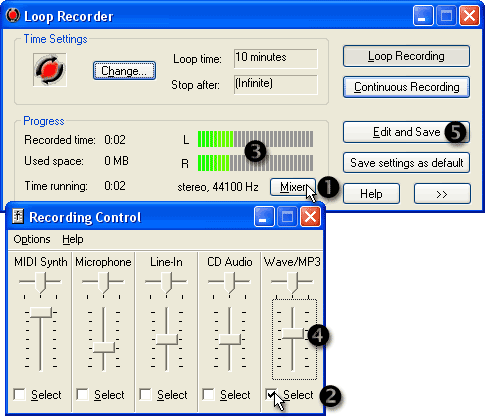
C) Select the recording source and level:
- Click the button
 Mixer.
 - Activate
 Wave by clicking Select. (Wave not available*?).
 - You should see the signal on the
 LEDs.
LEDs. - Change the
 recording volume so the LEDs show a medium level.
D) Wait until some music has been recorded
E) Save your recording to disk:
Click the button  Edit and Save.
How do you use the editor? See the Editor Tutorial.
Tutorial Index
*) No channel "Wave" available?
Other possible channels for internet radio are:
- "What U Hear"
- "Stereo Mix"
- "Record Master"
- "Stereo Sum"
If there is none of the listed channels on your mixer, please try all of them until you see the signal on the LEDs of Loop Recorder.
© 1999 – 2024 Thomas Riechmann, Gerald Riechmann, all rights reserved.