 | ||||||||||||||||||
 | ||||||||||||||||||
 |
|
| ||||||||||||||||
 | ||||||||||||||||||
 Loop
Loop| Tutorials: Recording from the conventional radio/tuner | Friday, April 19, 2024 |
 A) Connect Receiver and PC Sound Card
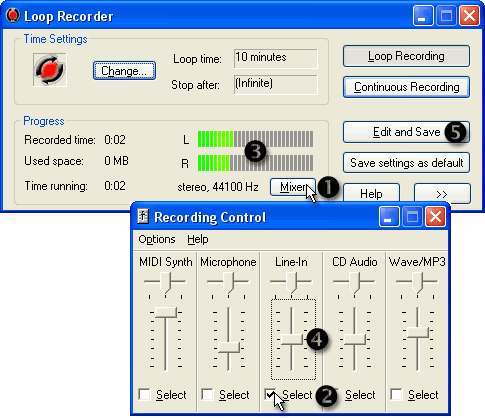
B) Open Loop Recorder
C) Select the recording source and level:
- Click the button
 Mixer.
 - Activate
 Line-in by clicking Select. .
 - You should see the signal on the
 LEDs.
LEDs. - Change the
 recording volume so the LEDs show a medium level.
D) Wait until some music has been recorded
E) Save your recording to disk:
Click the button  Edit and Save.
How do you use the editor? See the Editor Tutorial.
Tutorial Index
© 1999 – 2024 Thomas Riechmann, Gerald Riechmann, all rights reserved.